Pre-Summer Sale Special - Limited Time 70% Discount Offer - Ends in 0d 00h 00m 00s - Coupon code: xmaspas7

Easiest Solution 2 Pass Your Certification Exams

CCFH-202b CrowdStrike Certified Falcon Hunter Free Practice Exam Questions (2026 Updated)

Prepare effectively for your CrowdStrike CCFH-202b CrowdStrike Certified Falcon Hunter certification with our extensive collection of free, high-quality practice questions. Each question is designed to mirror the actual exam format and objectives, complete with comprehensive answers and detailed explanations. Our materials are regularly updated for 2026, ensuring you have the most current resources to build confidence and succeed on your first attempt.

Page: 1 / 1
Total 60 questions

During an investigation, you discover a Falcon host connecting from a country outside of those you normally do business with. Which built-in report would display Falcon hosts connecting from that country?

A.

Geo location activity

B.

Attack Paths

C.

Remote access graph

D.

Global connection heat map

Which document can reference any searchable event and its description?

A.

Events Index

B.

Query Builder

C.

Advanced Event Search

D.

Events Full Reference (Events Data Dictionary)

You want to hunt for the least-used Windows services that are starting from non-standard locations. Which query below will provide this information?

A.

#event_simpleName=ServiceStarted ImageFileName!=/(\\servicing\\|\\SysWOW64\\)/i | groupBy([ServiceDisplayName], function=[collect([ImageFileName] ), count(as=count)], l imit=20000) | sort(field=count, limit=20000, order=asc)

B.

#event_simpleName=ServiceStarted ImageFileName!=/(\\servicing\\|\\Services\\)/i | groupBy([ServiceDisplayName], function=[collect([ImageFileName] ), count(as=count)], limit=20000) | sort(field=count, limit=20000, order=asc)

C.

#event_simpleName=ServiceStarted ImageFileName!=/(\\servicing\\|\\System32\\)/i | groupBy([ServiceDisplayName], function=[collect([ImageFileName] ), count(as=count)], limit=20000) | sort(field=count, limit=20000, order=asc)

D.

#event_simpleName=ServiceStarted ImageFileName=/(\\System32\\)/i | groupBy([ServiceDisplayName], function=[collect([ImageFileName] ), count(as=count)], limit=20000) | sort(field=count, limit=20000, order=asc)

You are searching for all events related to a specific process. Which fields should be selected in a query?

A.

TargetProcessId and ContextProcessId

B.

ContextProcessId and timestamp

C.

timestamp and TargetProcessId

Which action helps identify an enterprise-wide file infection?

A.

Monitor the Falcon Console for alerts on suspicious process activity

B.

Analyze the Investigate Host dashboard to identify endpoints with high-risk file activity

C.

Utilize CrowdStrike Query Language (CQL) to search for files with the same hashes that have been renamed

D.

Utilize the IP addresses Investigate dashboard to find the hosts' processes that are connecting to an unusual IP

Your team received a detection regarding a potentially malicious binary executing on an endpoint. Using CQL (CrowdStrike Query Language), you want to identify all events that relate to this detection. Which field is used to correlate events to this detection?

A.

TreeId

B.

ParentProcessId

C.

event_simpleName

D.

ComputerName

Falcon Machine Learning has prevented and quarantined a file being written to disk that has VSCode as a parent process. This file was compiled by the system owner. What should the next steps be?

A.

Detonate the file in a private sandbox, and write a Machine Learning exclusion if the file activity is expected

B.

Search for the file hash in VirusTotal, and write a Sensor Visibility Exclusion

C.

Detonate the file in a private sandbox, and write an exclusion for the Indicator of Attack (IOA) if the file activity is expected

D.

Immediately network contain the host as VSCode is frequently used for malicious tunneling

You receive a detection with the following command line:

C:\Windows\system32\cmd.exe /Q /c echo ping -n 1 google.com > \\VICTIM-MACHINE\C$\_______________output 2 > & 1 > C:\Windows\pJYOrvQB.bat & C:\Windows\system32\cmd.exe /Q /c C:\Windows\pJYOrvQB.bat & del C:\Windows\pJYOrvQB.bat

What describes the activity observed?

A.

Administrator setting default DNS resolver for google.com via a .bat script

B.

Impacket tooling testing network connectivity on host as a part of reconnaissance activity

C.

Administrator testing network activity via connectivity of .bat script to ping google.com

D.

Impacket tooling executing Mimikatz attack via a .bat script as a part of privilege escalation activity

Which statement will filter for all events that correspond to a new scheduled task registered by the user "Doris"?

A.

#event_simpleName=ProcessRollup2 FileName="*.sht" | UserName="Doris"

B.

#event_simpleName=ScheduledTaskRegistered | UserName="Doris"

C.

#event_simpleName=ProcessRollup2 ProcessName="taskmgr.exe" | UserName="Doris"

D.

#event_simpleName=NewScheduledTaskRegistered | UserName="Doris"

You are investigating a compromise on a Linux host. You suspect that the host is running an older version of Apache and that the Log4j (CVE-2021-44228) vulnerability is being exploited using JNDI lookups. Which CQL query could you use to determine if Log4j is the root cause of the compromise?

A.

ExternalApiType=Event_DetectionSummaryEvent DetectionDescription=/log4j/i

B.

#event_simpleName=HttpRequest | HttpRequestHeader=/.*jndi:\w{1,5}:?\}?\/\/.*\)/i

C.

#event_simpleName=Cve-Detection | Cve-Number="CVE-2021-44228"

D.

#event_simpleName=ScriptControlDetectInfo ScriptContent=/.*jndi:\w{1,5}:?\}?\/\/.*\}/i

You are performing an advanced search of all detections in the last 90 days in your environment and want to group the detections via the FileName and CommandLine parameters for easier viewing. Which query will group the detections correctly?

A.

#repo=detections EventType="Event_ExternalApiEvent" ExternalApiType="Event_DetectionSummaryEvent" | stats([FileName, CommandLine], function=collect([ComputerName] ), limit=max)

B.

#repo=detections EventType="Event_ExternalApiEvent" ExternalApiType="Event_DetectionSummaryEvent" | groupBy([FileName, CommandLine], function=collect([ComputerName] ), limit=max)

C.

#repo=detections EventType="Event_ExternalApiEvent" ExternalApiType="Event_DetectionSummaryEvent" | stats countby([FileName, CommandLine], function=collect([ComputerName] ), limit=max)

D.

#repo=detections EventType="Event_ExternalApiEvent" ExternalApiType="Event_DetectionSummaryEvent" | table([FileName, CommandLine, ComputerName])

Which pre-defined reports will show activities that typically indicate suspicious activity occurring on a system?

A.

Sensor reports

B.

Timeline reports

C.

Scheduled searches

D.

Hunt reports

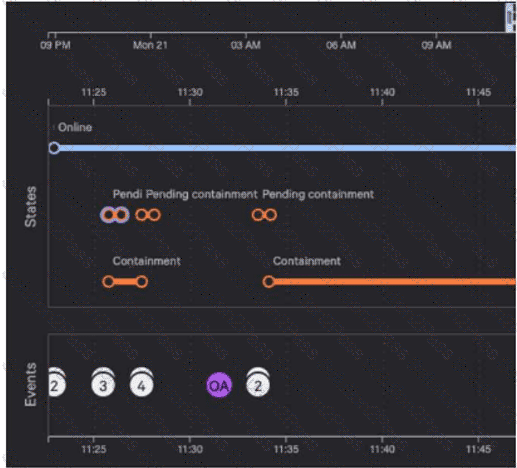
Refer to the image.

Why are there six pending containment events?

A.

When requesting containment of a device, there is one event to contain the host by Agent ID and another event to contain by Mac Address

B.

When requesting containment of a device, there is one event for checking of the current host state and another corresponding to the change request

C.

When requesting containment of a device, there is one event to contain the host by Agent ID and another event to contain by Host Name

D.

When requesting containment of a device, there is one event for the change request and another corresponding to the completed status of the request

You want to use result data from an Advanced Event Search to create a custom dashboard that will display the total number of detections in a seven-day time period. Which widget will allow you to display the total number of detections as a single value digit?

A.

Gauge Widget

B.

Time Chart Widget

C.

Scatter Chart Widget

D.

Heat Map Widget

While performing a threat hunt in your environment, you decide to identify rare occurrences of user agent strings over the past 30 days. Which query will highlight those results using CQL?

A.

groupBy(UserAgentString, function=collect([ComputerName, UserName, LocalAddressIP4])) | min(field=UserAgentString, limit=10)

B.

selectFromMin(field=UserAgentString, include=[ComputerName, UserName, LocalAddressIP4])

C.

groupBy(UserAgentString, function=[collect([ComputerName, UserName, LocalAddressIP4]), count()] ) | sort(_count, order=asc, limit=10)

D.

tail(field=UserAgentString, limit=10, include=[ComputerName, UserName, LocalAddressIP4])

What will the following obfuscated command do?

cmd /c "set x=^n^e^t & set y=@er & set yy=z & set z=r & set r=remove & set f=Domain+ff & set ff=Admin & set g=gumball@ & echo %x%%y:@=us% /%z:r=add% %ff% %g:@=r% | cmd"

A.

Add a user named “Admin” to the local host

B.

Remove a user named “Admin” from the local host

C.

Change the password for a user named “Admin” to “%g:@=r%”

D.

Add a user named “Admin” to the Domain Admins group

What is the purpose of this query?

#event_simpleName=UserLogon LogonType=10 RemoteAddressIP4=* | !cidr(RemoteAddressIP4, subnet=["224.0.0.0/4", "10.0.0.0/8", "172.16.0.0/12", "192.168.0.0/16", "127.0.0.0/8", "169.254.0.0/16", "0.0.0.0/32"]) | ipLocation(RemoteAddressIP4) | worldMap(ip=RemoteAddressIP4, magnitude=count(aid))

A.

Display all locations for local subnets on a map

B.

Display all users who are logging in from private IP ranges on a map

C.

Display geolocation data for all network logins on a map

D.

Display geolocation data for RDP connections on a map

You get a detection for a malicious PowerShell script with the process flow below:

Unknown Process - > chrome.exe - > wscript.exe - > powershell.exe Which process should you investigate further to identify the source of the script?

A.

chrome.exe

B.

wscript.exe

C.

Unknown Process

D.

powershell.exe

Page: 1 / 1
Total 60 questions
Copyright © 2014-2026 Solution2Pass. All Rights Reserved