Summer Sale Special - Limited Time 70% Discount Offer - Ends in 0d 00h 00m 00s - Coupon code: xmaspas7

Easiest Solution 2 Pass Your Certification Exams

NSE6_FMG_AD-7.6 Fortinet NSE 6 - FortiManager 7.6 Administrator Free Practice Exam Questions (2026 Updated)

Prepare effectively for your Fortinet NSE6_FMG_AD-7.6 Fortinet NSE 6 - FortiManager 7.6 Administrator certification with our extensive collection of free, high-quality practice questions. Each question is designed to mirror the actual exam format and objectives, complete with comprehensive answers and detailed explanations. Our materials are regularly updated for 2026, ensuring you have the most current resources to build confidence and succeed on your first attempt.

Page: 1 / 1
Total 65 questions

A service provider administrator has assigned a global policy package to a managed customer ADOM named My_ADOM. The customer administrator has access only to My_ADOM.

How can the customer administrator edit the global header policy of the global policy package?

A.

The customer administrator can edit the header policy by using workspace mode on the global ADOM.

B.

The customer administrator can edit the header policy by using workflow mode on the global ADOM and My_ADOM.

C.

The service provider administrator can unlock the global policy from the global ADOM to authorize changes to the customer administrator.

D.

The customer administrator cannot edit the global header policy; only the service provider administrator can make changes from the global ADOM.

An administrator has a FortiGate-HQ device with VDOMs—root, HR and Facilities, currently managed under the FortiManager ADOM—Site1. They try to move VDOM HR to the FortiManager ADOM—Site2, but it does not work.

Why is the administrator not able to move FortiGate-HQ VDOM HR to FortiManager ADOM—Site2?

A.

The FortiGate-HQ must be managed under the FortiManager ADOM—root to allow moving its VDOMs to different ADOMs.

B.

The administrator must have full access in the device layer of FortiGate-HQ VDOM-root before they can VDOMs to different ADOMs.

C.

FortiManager must be in ADOM normal mode, which does not allow VDOMs to be managed separately.

D.

The administrator must delete the FortiGate-HQ device from FortiManager and add it again using the Add Device wizard before moving the VDOM.

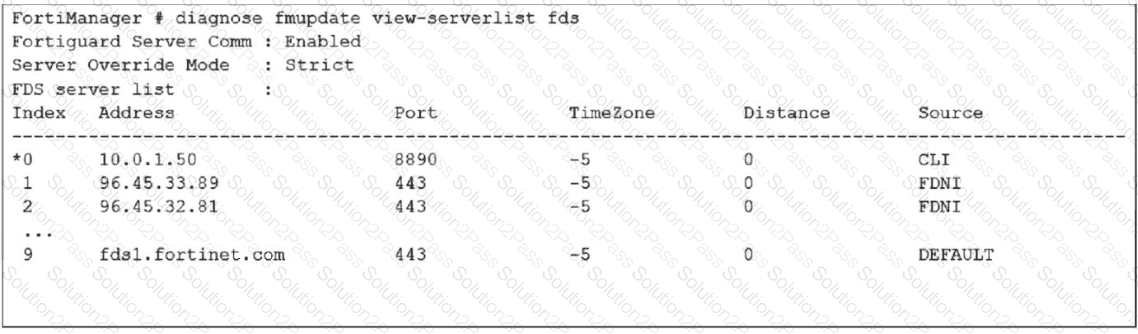
Refer to the exhibit.

How does FortiManager get antivirus and IPS updates? Choose one answer

A.

It uses all URLs in the list that contain the fds host name.

B.

It gets updates from the server with IP address 10.0.1.50.

C.

It connects to all servers marked as FortiGuard Distribution Network through Internet FDNI sources.

D.

It connects to the public FortiGuard servers listed in the configuration

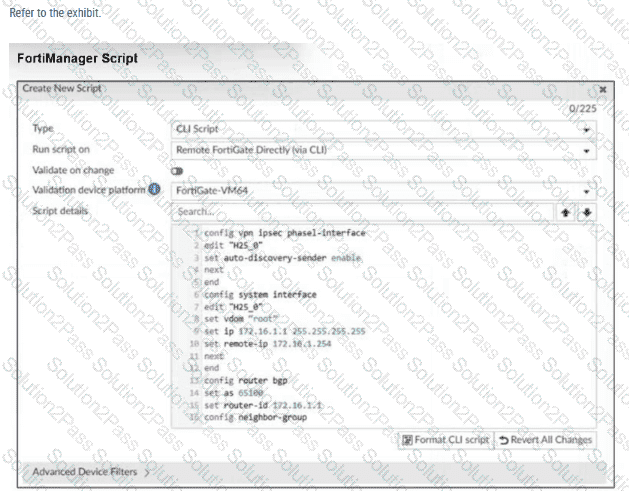
Refer to Exhibit:

Which two actions will occur if you run the script using the Remote FortiGate Directly via CLI option? Choose two answers

A.

FortiManager will provide a preview of CLI commands before executing this script on a managed FortiGate.

B.

FortiManager will create a new revision history.

C.

FortiGate will auto-updated the FortiManager device-level database.

D.

You will have to install these changes using the Install Wizard.

Refer to the following configuration. FortiManager # config system global global# set workspace-mode normal global# end FortiManager # What are two results from the configuration shown in the exhibit? Choose two answers

A.

The same administrator can lock more than one ADOM at the same time.

B.

Multiple administrators can lock and work on separate ADOMs at the same time.

C.

All changes must be approved before they can be installed on a device.

D.

Concurrent read-write access to an ADOM is disabled.

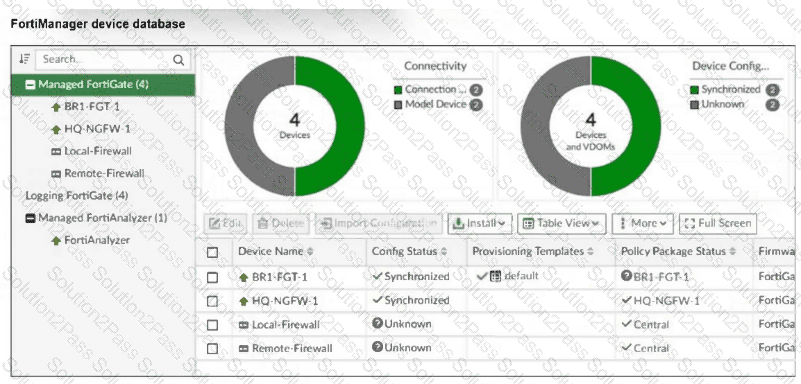
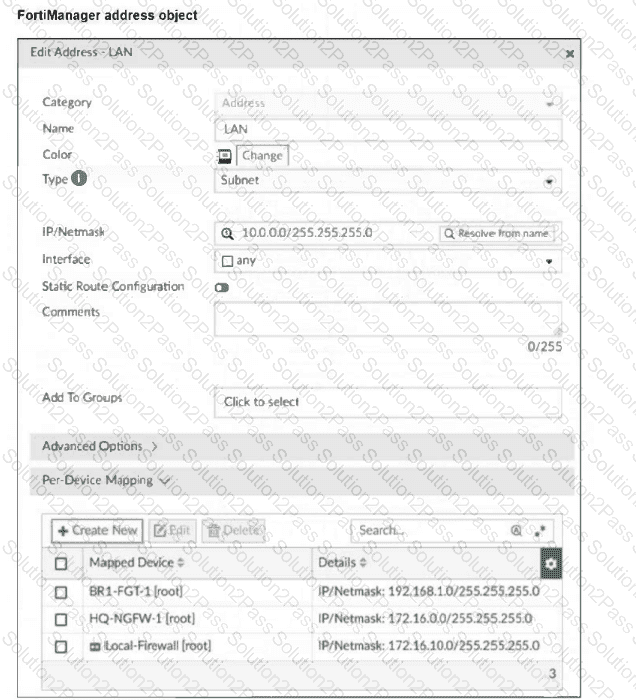
Refer to the exhibits.

Which IP/netmask will be present in the LAN firewall address object on the Remote-Firewall?

A.

172.16.0.0/255.255.255.0

B.

10.0.0.0/255.255.255.0

C.

192.168.1.0/255.255.255.0

D.

172.16.10.0/255.255.255.0

A FortiManager administrator has moved a FortiGate device to a new ADOM, but they cannot see the policy or object configurations for that FortiGate.

What should the administrator do to see the policy or object configurations?

A.

Use ADOM shared objects to restore all missing data.

B.

Reset the device and add it to the new ADOM again.

C.

Import the policy package manually using the Import Configuration wizard.

D.

Use ADOM sync to restore the missing configurations.

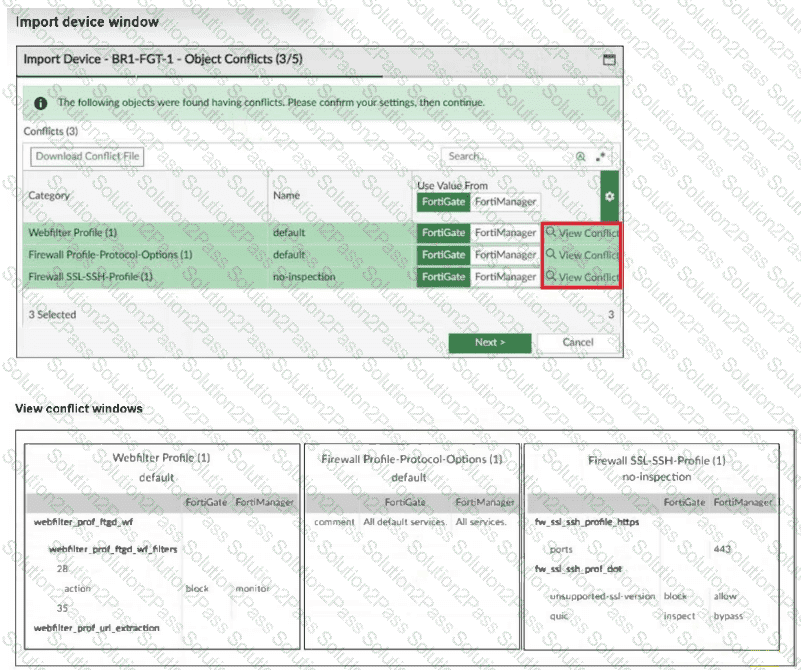
Refer to the exhibits.

An administrator added BR1-FGT-1 to FortiManager and started importing the policy package. During the process, they saw that they need to choose values from FortiGate or FortiManager.

Which conclusion is most clearly supported by the exhibits?

A.

BR1-FGT-1 does not support the SSL/SSH profile with HTTPS on port 443.

B.

The administrator must match the FortiOS firmware version with the FortiManager ADOM firmware version to resolve the conflict status.

C.

The default Firewall Profile-Protocol-Options object is the only profile that does not significantly affect any configuration changes on either FortiManager or FortiGate.

D.

FortiManager has a different FortiGuard database compared to FortiGate BR1-FGT-1 for the QUIC protocol.

An administrator has assigned a global policy package to a new ADOM named ADOM1.

What will happen if the administrator tries to create a new policy package in ADOM1?

A.

The administrator will be able to select the option to assign the global policy package to the new policy package.

B.

FortiManager will automatically assign the global policy package to the new policy package.

C.

FortiManager will automatically install policies on the policy package in ADOM1.

D.

The administrator will have to assign the global policy package from the global ADOM.

An administrator notices that CLI scripts are failing on some FortiGate devices because they use different FortiOS versions.

Which two actions should the administrator take to fix the failing CLI scripts? Choose two answers.

A.

Create separate ADOMs for each FortiOS version.

B.

Disable CLI scripts for devices using older firmware.

C.

Modify the CLI scripts to include conditional commands based on FortiOS version.

D.

Create version-specific CLI script groups and assign them to the appropriate devices.

An administrator assigned the Training global policy package to the Branches policy package in ADOM1. Later, the administrator created a new policy package named Remotes on ADOM1.

What should the administrator do to sync the Training global policy package with the Remotes policy package in ADOM1?

A.

Manually add and assign the Remotes policy package to the Training global policy package

B.

Use the automatically install policies to ADOM devices method to sync from the Training global policy package to the Remotes policy package

C.

Assign the Training global policy package to the Remotes policy package

D.

Unassign the Training policy package and reassign it to all policy packages within ADOM1

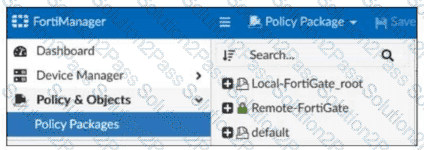
Refer to the exhibit.

Which two statements about the configuration shown in the exhibit are true? Choose two answers.

A.

An administrator can lock the Local-FortiGate_root policy package.

B.

The administrator created a snapshot of the Remote-FortiGate policy package.

C.

The FortiManager ADOM workspace mode is set to normal.

D.

The FortiManager is in workflow mode.

An administrator must create a policy and install it on a FortiGate device within an ADOM in backup mode.

How can the administrator perform this task?

A.

Use the Install Wizard located on the device manager.

B.

Enable workflow mode to allow policy creation and approval.

C.

Make sure the ADOM and FortiGate firmware versions match and use the ADOM policy package.

D.

Use a FortiManager script to apply the configuration changes.

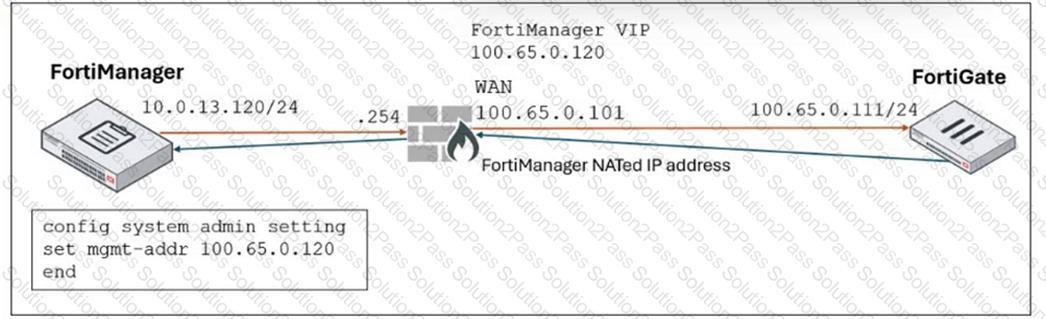
Refer to the exhibit.

FortiManager is operating behind a network address translation (NAT) device, and the administrator configured the FortiManager NATed IP address under the FortiManager system administration settings.

What is the expected result during discovery?

A.

FortiManager sets both the 100.65.0.120 IP address and 10.0.13.120 IP address on FortiGate.

B.

FortiManager sets both the 100.65.0.120 IP address and 100.65.0.101 IP address on FortiGate.

C.

FortiManager sets the 100.65.0.101 IP address on FortiGate.

D.

FortiManager sets the 100.65.0.120 IP address on FortiGate.

What is the best explanation of how FortiManager helps with mass provisioning?

A.

It upgrades the OS of each FortiGate device.

B.

It provides local FortiGuard Distribution Server (FDS) services to the network.

C.

It uses templates to configure the same settings on many devices simultaneously.

D.

It sends email alerts when new devices connect.

An administrator created a new global policy package that includes both header policies and footer policies. What two things must the administrator know before deploying the global policy package to ADOM2? Choose two answers

A.

They can promote ADOM2 objects to global objects.

B.

They can assign the global policy package to all or selected policy packages within ADOM2.

C.

They must install from the ADOM2 layer to FortiGate when using the Automatically install policies to ADOM devices option.

D.

They can synchronize policy packages by importing from the ADOM2 policy package into the global ADOM policy package.

While attempting to push a NetFlow configuration script through the FortiManager policy package: an administrator encounters an error stating that an object is unrecognized in line 4.

What must the administrator do to successfully apply the NetFlow configuration script and avoid the object unrecognized error?

A.

Make sure the user running the script has full access to the VDOM—AGEUSR.

B.

Run the script on the device database.

C.

Use metadata variables if they use VDOMs in the script.

D.

Create a normalized interface on the policy layer before running the script.

What allows FortiManager to run CLI scripts on FortiGate devices without prompting for SSH authentication each time?

A.

FortiGate devices using the legacy login method.

B.

The secure management tunnel between FortiManager and FortiGate devices.

C.

The script using the Remote FortiGate Directly via CLI option.

D.

The script on the FortiManager device database.

An administrator configures a new BGP peer in the FortiManager device-level database of FortiGate. They reinstall the policy package to the managed FortiGate device without any errors. However, when the administrator logs in to FortiGate, they do not see the BGP configuration changes.

What is the most likely reason why FortiManager did not push the BGP peer changes to FortiGate?

A.

The administrator must run a sanity check on FortiManager to make sure the database is not corrupted.

B.

Fortigate has a BGP template assigned on the FortiManager database.

C.

The administrator must use the Install Wizard and select Install device settings only to push BGP settings

D.

The FortiGate firmware version is different from the FortiManager ADOM version.

Page: 1 / 1
Total 65 questions
Copyright © 2014-2026 Solution2Pass. All Rights Reserved