INF-306 IT Specialist HTML5 Application Development Free Practice Exam Questions (2026 Updated)
Prepare effectively for your IT Specialist INF-306 HTML5 Application Development certification with our extensive collection of free, high-quality practice questions. Each question is designed to mirror the actual exam format and objectives, complete with comprehensive answers and detailed explanations. Our materials are regularly updated for 2026, ensuring you have the most current resources to build confidence and succeed on your first attempt.
Review the following markup segment:
< form action= " process.js " method= " get " >
< label for= " secretcode " > Secret Code < /label >
< input type= " text " name= " secretcode "
pattern= " [a-zA-Z]{4}-[0-9] {2}-[0-9]{4}-[a-zA-Z] {4} "
placeholder= " secretcode " >
< input type= " submit " value= " Submit " >
< /form >
Which entry will validate successfully according to the required pattern?
Which markup segment uses the output element to display the combined value of two input elements in HTML5?
Which two functions support 2D transformations in CSS3? Choose 2.
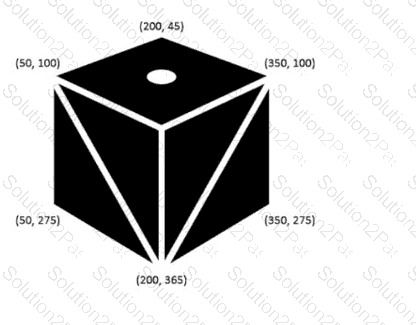
The logo shown is displayed on a web page as an SVG.
Note: The coordinate values are labeled for reference.
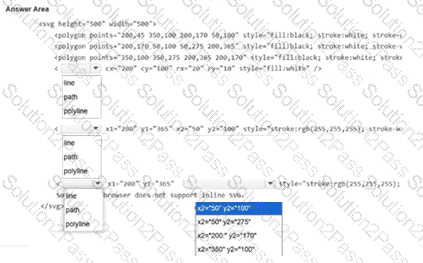
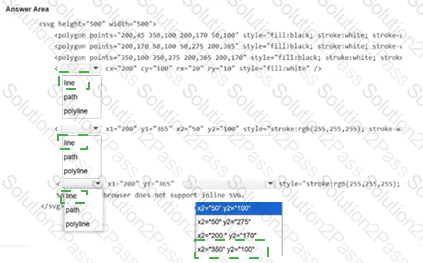
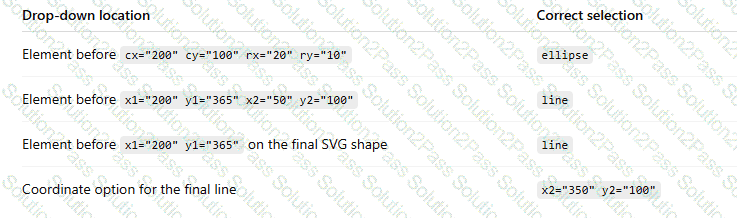
Evaluate the image on the left and complete the markup by selecting the correct option from each drop-down list.
Note: You will receive partial credit for each correct selection.
You need to contain overflowing text inside the element ' s border without creating unneeded scrollbars or losing text. Which attribute setting should you use?
Which value does the following JavaScript code fragment store in the variable num?
var num = localStorage.length;
The following form is missing validation attributes:
< form >
< div class= " container " >
< h1 > Register Here < /h1 >
< p > Please fill in the details to create an account with us. < /p >
< hr >
< label for= " ? " > < b > Enter Email < /b > < /label >
< input type= " ? " placeholder= " Enter Email " name= " ? " placeholder= " username@domain.com " >
< label for= " ? " > < b > Password < /b > < /label >
< input type= " ? " placeholder= " Enter Password " name= " ? " >
< label for= " ? " > < b > Confirm Password < /b > < /label >
< input type= " ? " placeholder= " Confirm Password " name= " ? " >
< label for= " phone " > < b > Phone < /b > < /label >
< input type= " tel " id= " phone " name= " phone " placeholder= " 123-45-678 " >
< hr >
< p > By creating an account you agree to our < a href= " # " > Terms & Privacy < /a > . < /p >
< button type= " submit " class= " registerbtn " > < strong > Register < /strong > < /button >
< /div >
< /form >
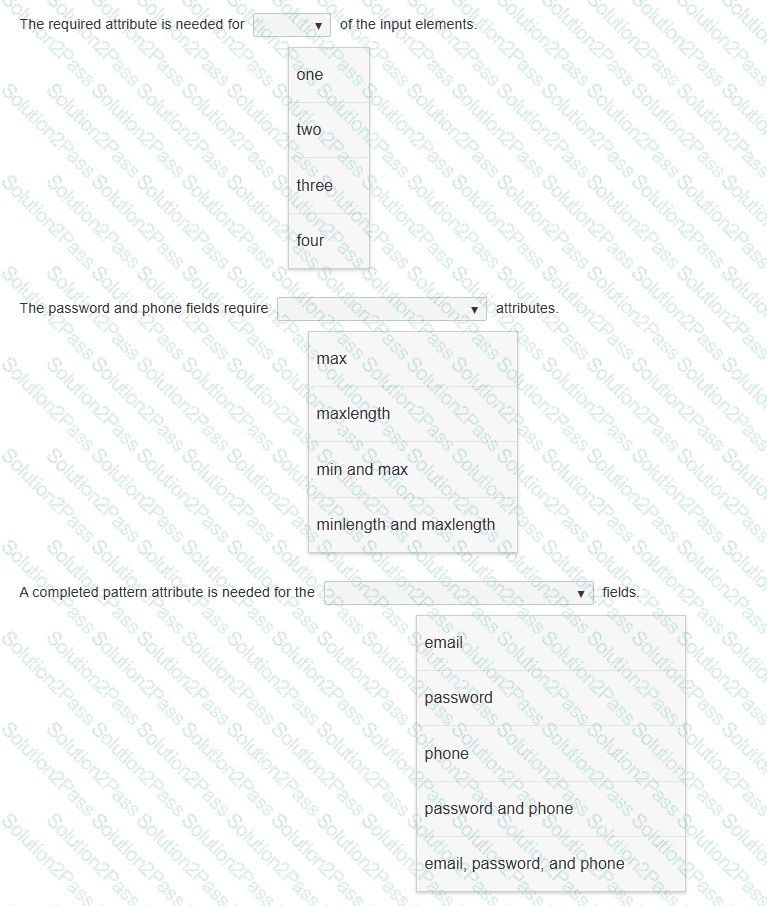
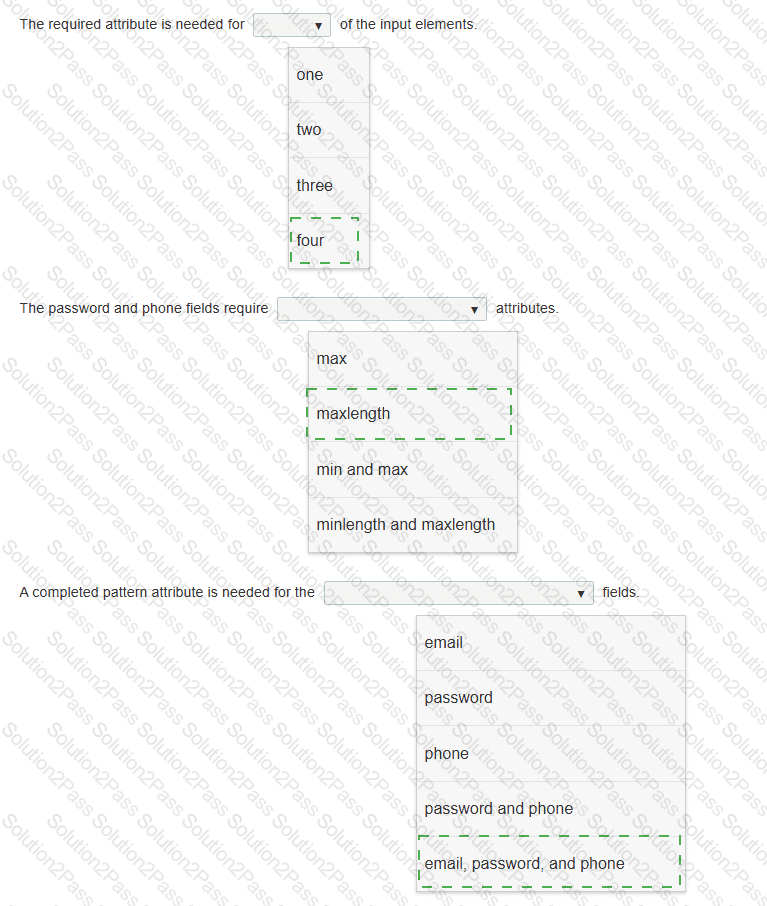
You need to update the form to enforce the following requirements for visitors:
• All fields must be completed with valid information.
• The users should not be allowed to type passwords longer than 8 characters.
• Passwords must use only numbers and letters.
• Phone numbers and email addresses must follow the configuration of the placeholder text.
• The browser must display an error message that makes it clear what type of input change is needed.
Review the markup on the left.
Complete the sentences by selecting the correct option from each drop-down list.
Note: You will receive partial credit for each correct selection.
Which two code segments declare a JavaScript method? Choose 2.
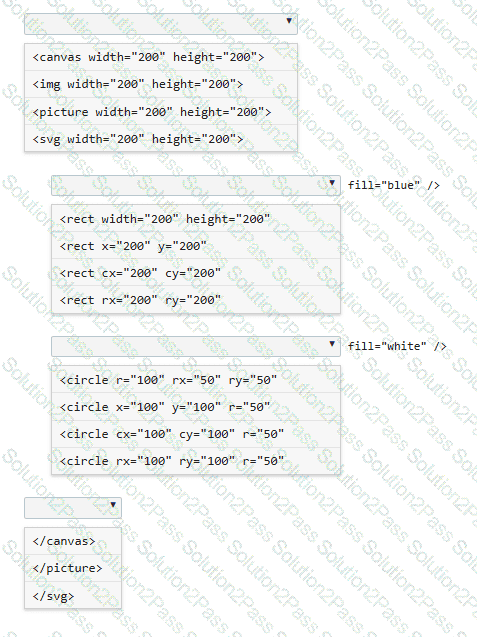
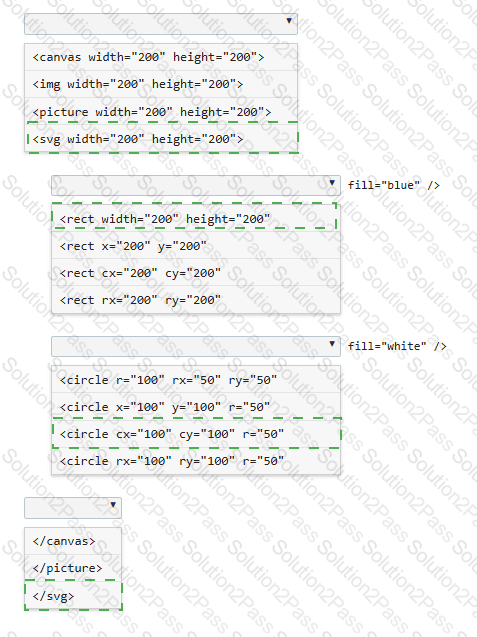
You need to draw a blue rectangle that meets these conditions:
• It is 200 by 200 pixels.
• It contains a white circle that is centered within the rectangle.
• The circle has a 50-pixel radius.
• The image should appear as follows: a blue square with a centered white circle.
Refer to the image on the left.
You need to ensure that the image scales without distortion when the page is resized. You must not be required to use JavaScript.
Complete the code by selecting the correct option from each drop-down list.
Note: You will receive partial credit for each correct selection.
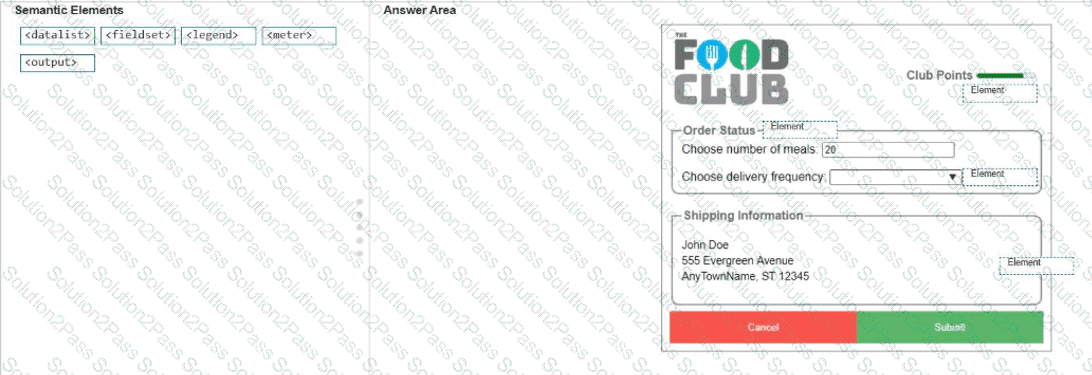
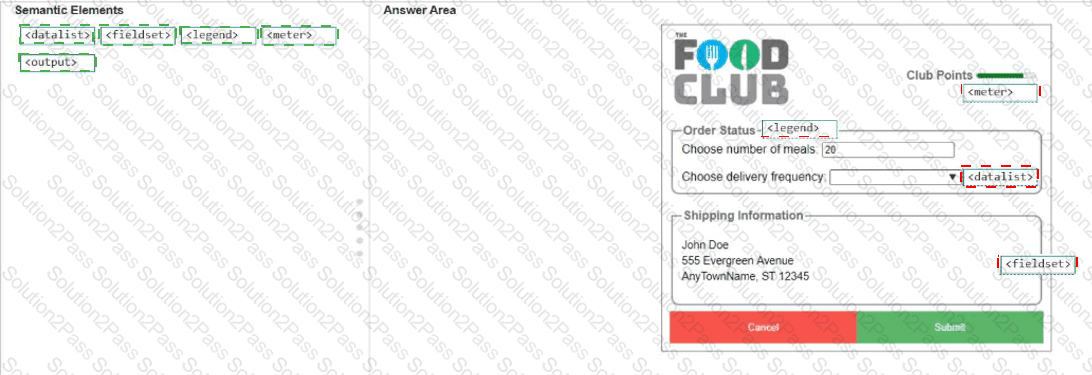
You need to identify the form elements.
Move the appropriate semantic elements from the list on the left to the correct locations on the right.
Note: You will receive partial credit for each correct response.
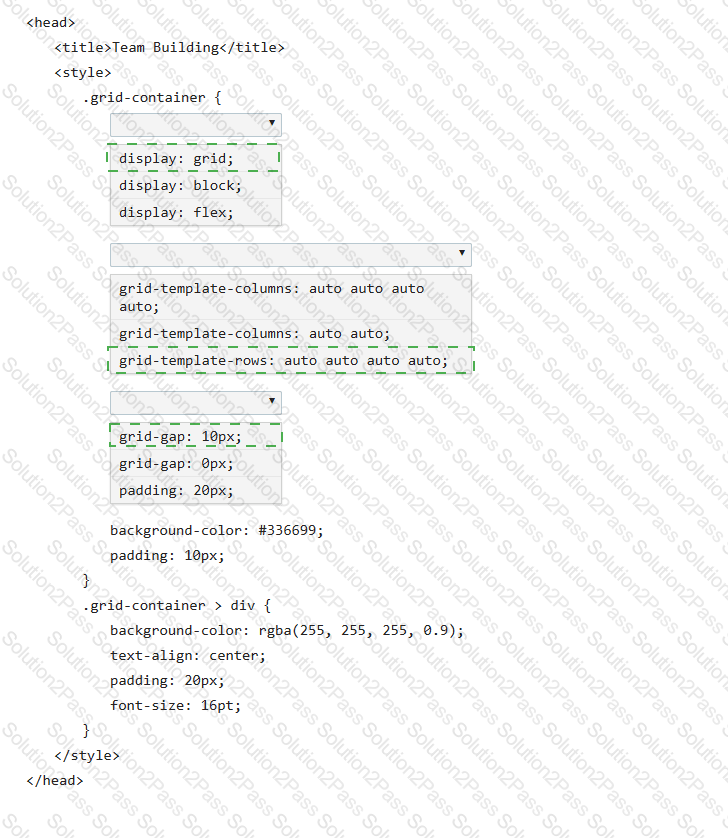
You need to use CSS to create the layout shown:
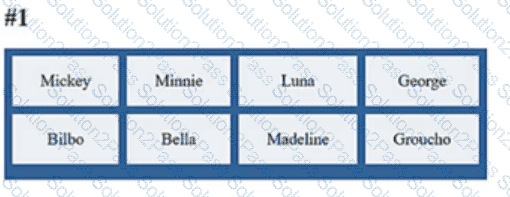
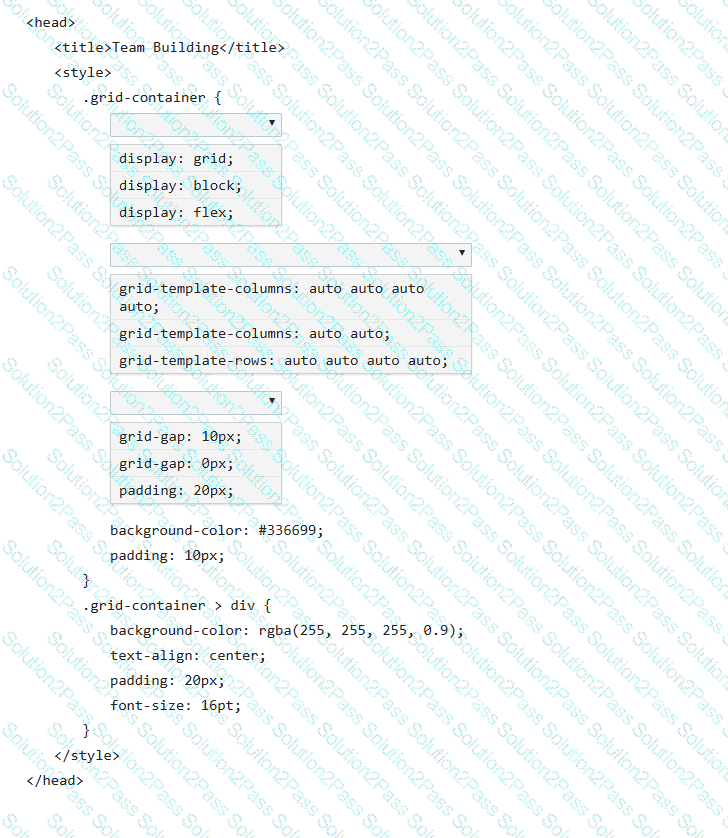
Review the layout shown on the left.
Complete the markup by selecting the correct option from each drop-down list.
Note: You will receive partial credit for each correct selection.
Which two background graphics will automatically adjust to different screen sizes? Choose 2.
Note: You will receive partial credit for each correct selection.
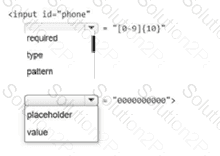
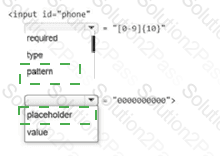
You need to ensure that the value of an input element is a valid 10-digit phone number with no symbols. The input element should initially display all zeroes, but that value should never be stored with the form.
Complete the markup by selecting the correct option from each drop-down list.
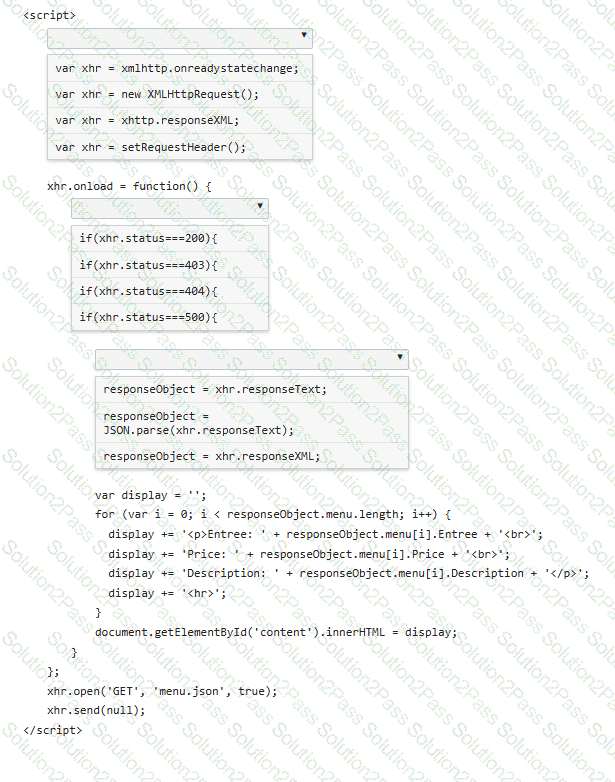
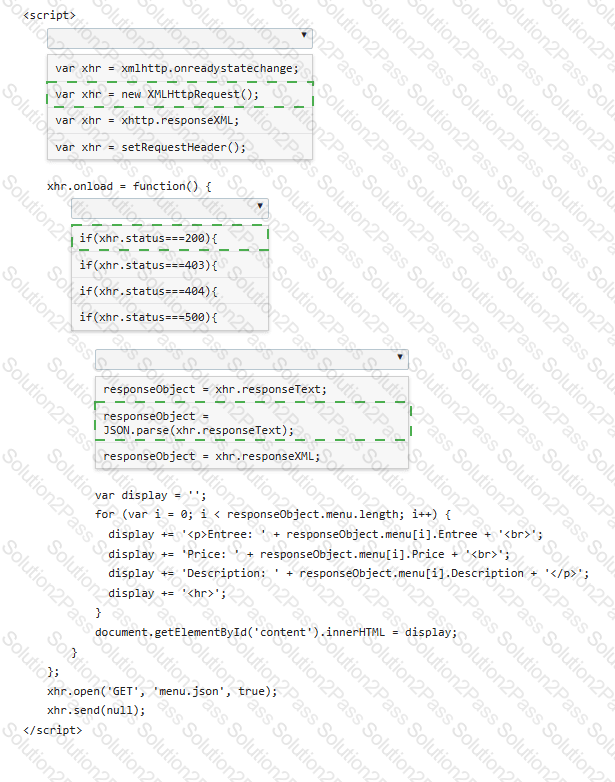
You are creating a script that reads a JSON menu file and displays the Entree, Price, and Description.
Complete the code by selecting the correct option from each drop-down list.
Note: You will receive partial credit for each correct selection.
You are drawing on the canvas defined by the white square.
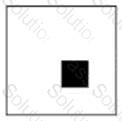
At which x, y coordinate is the upper-left corner of the filled square?
Which element should you use to rotate an SVG square?
You are creating the styling for your webpage. Which two CSS attributes produce a scroll bar if your content overflows its element? Choose 2.
Which two functions support 2D transformations in CSS3? Choose 2.
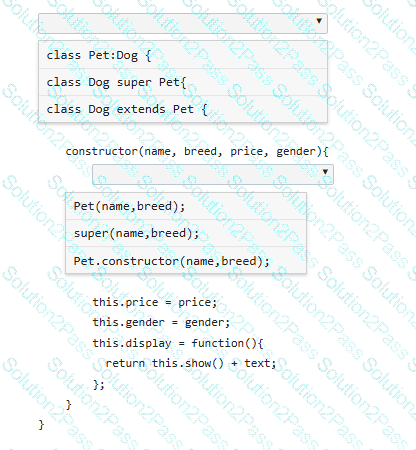
You define the Pet class as follows:
class Pet {
constructor(name, breed) {
this.name = name;
this.breed = breed;
this.show = function() {
var text = " < p > Your pet ' s name is " + name + " . The pet ' s breed is " + breed + " . < /p > " ;
return text;
};
}
}
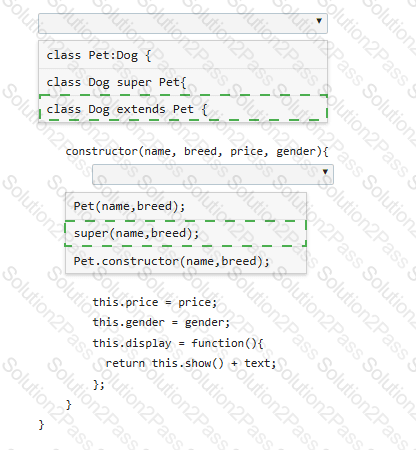
You need to derive a Dog class from the Pet class.
Complete the code by selecting the correct option from each drop-down list.
Note: You will receive partial credit for each correct selection.
You write the following markup to create a page. Line numbers are included for reference only.
01 < !DOCTYPE html >
02 < html >
03 < head >
04 < style >
05
10 < /style >
11 < /head >
12 < body >
13 < svg height= " 500 " width= " 500 " >
14 < defs >
15 < filter id= " f2 " x= " 0 " y= " 0 " width= " 200% " height= " 200% " >
16 < feOffset result= " offOut " in= " SourceGraphic " dx= " 20 " dy= " 20 " / >
17 < feGaussianBlur result= " blurOut " in= " offOut " stdDeviation= " 10 " / >
18 < feBlend in= " SourceGraphic " in2= " blurOut " mode= " normal " / >
19 < /filter >
20 < /defs >
21 < text x= " 10 " y= " 100 " style= " fill:red; " > Blur Me! < /text >
22 Sorry, your browser does not support inline SVG.
23 < /svg >
24 < /body >
25 < /html >
An SVG blur filter is defined in the markup on the left. You need to apply the SVG blur filter to the text element on the page.
Which CSS code should you insert at line 05?