Workday-Pro-HCM-Reporting Workday Pro HCM Reporting Certification Exam Free Practice Exam Questions (2026 Updated)
Prepare effectively for your Workday Workday-Pro-HCM-Reporting Workday Pro HCM Reporting Certification Exam certification with our extensive collection of free, high-quality practice questions. Each question is designed to mirror the actual exam format and objectives, complete with comprehensive answers and detailed explanations. Our materials are regularly updated for 2026, ensuring you have the most current resources to build confidence and succeed on your first attempt.
You are building a report to identify employees who have exceeded the allowed number of 10 sick days in the current year.
Using the Sick Days Taken field, what is the correct formula to create a Boolean calculated field that returns True if an employee has exceeded the allowed number of sick days?
The benefits manager position has recently been filled by a different worker. The previous benefits manager has transferred ownership of the report schedules to the new manager. Month end is coming up and the new manager is wondering which reports are scheduled to be run automatically.
Where can the manager view this information?
Refer to the following scenario to answer the question below.
You have prepared the following matrix report for a recruiting manager.
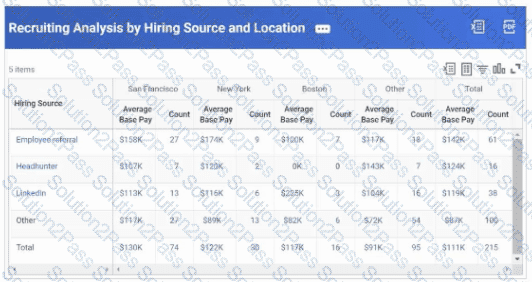
The recruiting manager would like to view the top ten hiring sources, rather than just three.
How can you adjust the report definition to address this requirement?
How can you capture proposed values relating to a business process event on a report?
You need a calculated field that returns whether or not the initiator for a Manage Goals event is the worker's manager.
A worker report uses a filter based on the Location field, using the comparison type Prompt the user for a value. A user runs this report and leaves the prompt value blank.
What Worker instances display on the output?
You want to view benefit cost by benefit enrollment for the current year compared to the prior year to evaluate increases or decreases in plan enrollment, displaying formatted cost and count variance calculations.
What type of report would allow you to do this?
You need to create a report to show the trend of worker headcount over time.
What is the most appropriate data source for this report?
You are creating a custom report that displays employee salary amounts. You need to ensure that compensation analysts have the appropriate security permissions to view this information for all employees.
How do you confirm the security group's access to salary amounts?
The Recruiting department requested a report that shows job applications by recruiting source, displayed through count and percent summaries that they can drill into to further analyze the data.
What report type fulfills these requirements?
You are building a composite report that uses two subreports with different data sources. You are noticing duplicate prompts when you run your composite report.
How can you resolve this problem?
Refer to the following scenario to answer the question below.
You have prepared the following matrix report for a recruiting manager.
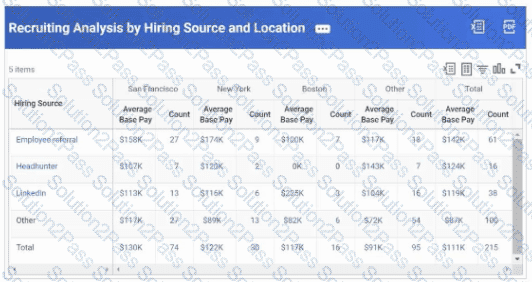
The recruiting manager wants to dynamically refine the output results for various hiring sources and locations.
How can you achieve this?
You are configuring a matrix report that shows workers' average base pay by job profile. You would like to add a field to the Detail Data that shows a worker's compensation group, which is data that is associated with the Job Profile business object.
You want the ability to view every summarization in the composite report by Location.
What do you do?
You are configuring a waterfall visualization showing employee movement. To properly display the information, you need the Termination Count field to return as a negative number.
You are configuring a data column on a composite report. You would like to map a subreport prompt to a value in a prompt set, but the prompt is not appearing on the Map Sub Report Prompts grid in the column configuration options.
What could be causing this?
The Chief Learning Officer wants you to build a report that lists all current learning content and any information you have relating to ratings and popularity.
How should you find the relevant fields and data sources that are available for you to create this report?
