Workday-Pro-Time-Tracking Workday ProTime Tracking Exam Free Practice Exam Questions (2026 Updated)
Prepare effectively for your Workday Workday-Pro-Time-Tracking Workday ProTime Tracking Exam certification with our extensive collection of free, high-quality practice questions. Each question is designed to mirror the actual exam format and objectives, complete with comprehensive answers and detailed explanations. Our materials are regularly updated for 2026, ensuring you have the most current resources to build confidence and succeed on your first attempt.
Refer to the following scenario to answer the question below.
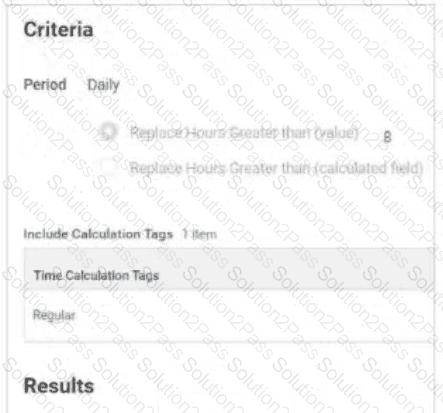

Table is labeled Include Calculation Tags 1 Item
The Time Calculation Tag included is Regular.
Results:
Add Tags field includes Daily Overtime.
Remove Tags field is empty.
Time Day Based On field selection is Calculated Date
The Daily Overtime calculation is tagging hours with both the Regular and Daily Overtime tags. This calculation should only tag hours with the Daily Overtime tag.
What should you edit in the calculation?
You need to create a validation that warns a worker if they have multiple time blocks with overtime in a time period.
What is the top-level business object?
What calculated field type will you use to calculate the number of holidays a worker has in a time week?
A worker’s Work Schedule Calendar has a Day Breaker of 2:00 AM (current day from previous day). They report regular hours from 8:00 PM, April 05 to 4:00 AM, April 06.
How will the calculated hours show on the time block?
You have configured a Time Calculation Tag to tag all hours worked on the seventh consecutive day.
Where will these hours display in the Worker’s Time Entry Calendar?
How are Time Tracking Calculations assigned to workers?
On what Time Tracking component can you enable Optional Out Times for a group of workers?
On what Time Tracking component can you configure a worktag as required?
What report should you use to check if a worker is eligible for more than one time entry template at a given time?
Refer to the following scenario to answer the question below.
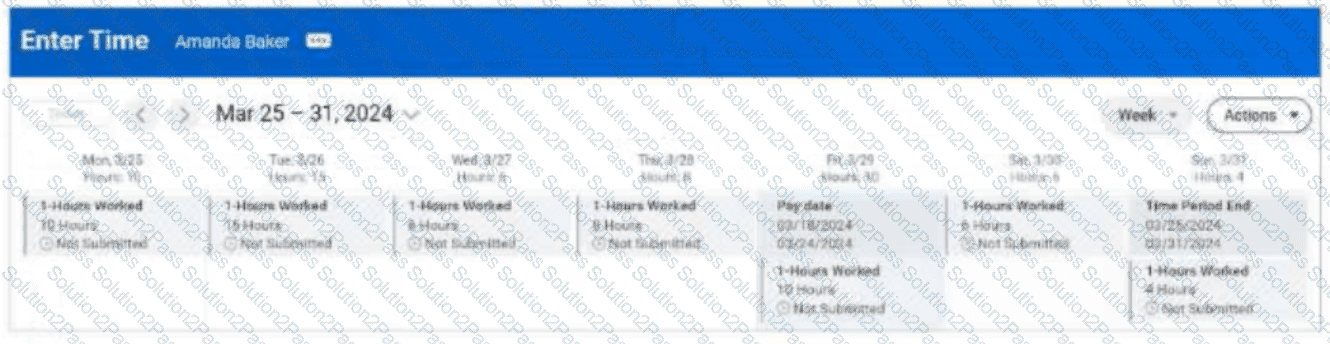
Amanda Baker is eligible for the following calculations: Daily OT > 8 regular hours in a day, Daily double time > 12 regular hours in a day, Weekly OT > 40 regular hours in a week.
What are the calculated hours for Friday?
The tenant includes a daily overtime calculation (regular hours > 8) with the priority of USA0045. You need to configure a daily double time calculation (regular hours > 12).
What priority should you assign to the Daily Double Time calculation so it calculates before the Daily Overtime?
Refer to the following scenario to answer the question below.
You have received a requirement to create a set of Time Tracking Components for workers who have the following attributes:
Time Type = Salary
Country = United States
Supervisory Organization = Facilities Group
You determine that a weekly period schedule exists that will meet these requirements.
How do you assign this weekly period schedule to this group of workers while not impacting other workers using this period schedule for Time Tracking?
To prevent a worker from entering time on a holiday, which two business objects can you reference to create a critical validation to remind workers of this restriction?
What report do you run to ensure that a period schedule is assigned to a worker?
You need to track regular hours and callback time. How will you configure the Callback time entry code so it is only used for time calculations referencing Callback tags?
Refer to the following scenario to answer the question below.
You are entering worked time for Amanda Baker, who is an employee in California. You discover that her daily overtime, daily double time, and weekly overtime calculations are not processing, even though they are configured in the tenant.
Once you determine the issue and fix the problem, what is the final action you must take to confirm that the configuration is successful?
