PEGACPRSA22V1 Pegasystems Certified Pega Robotics System Architect 22 Free Practice Exam Questions (2026 Updated)
Prepare effectively for your Pegasystems PEGACPRSA22V1 Certified Pega Robotics System Architect 22 certification with our extensive collection of free, high-quality practice questions. Each question is designed to mirror the actual exam format and objectives, complete with comprehensive answers and detailed explanations. Our materials are regularly updated for 2026, ensuring you have the most current resources to build confidence and succeed on your first attempt.
When interrogating an application in a Chrome or Edge browser without X-ray Vision enabled, Pega Robot Studio uses only three match rules to uniquely identify the control. Which three match rules does Pega Robot Studio use when interrogating Chrome or Edge? (Choose Three)
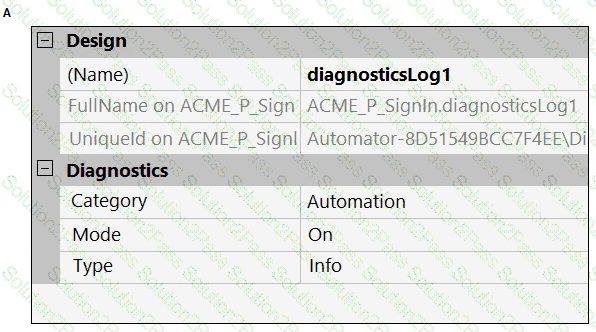
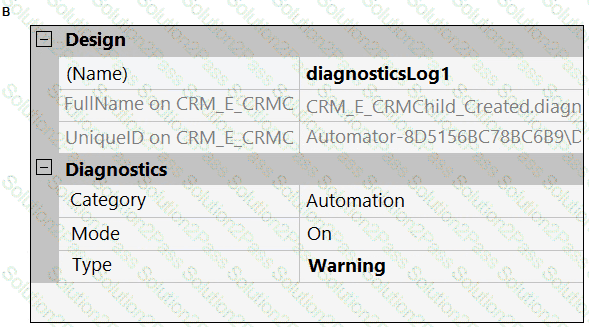
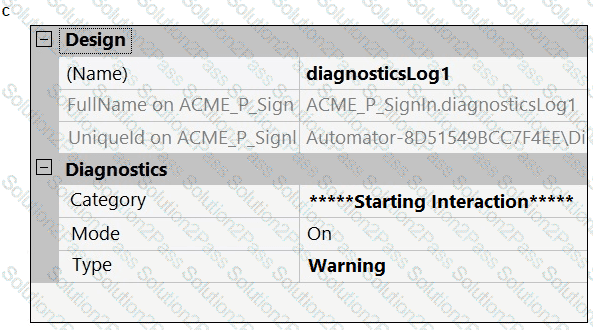
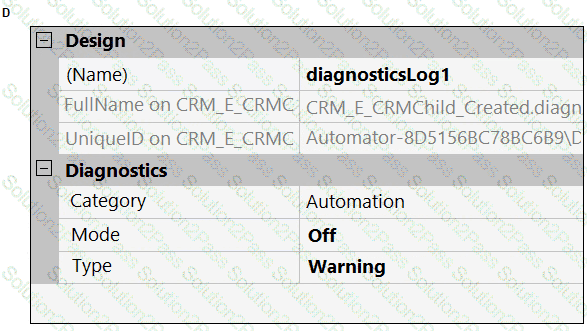
A developer adds a diagnostic log component to an automation and checks the log file.

Based on the image, how did the developer configure the diagnostic log component settings?
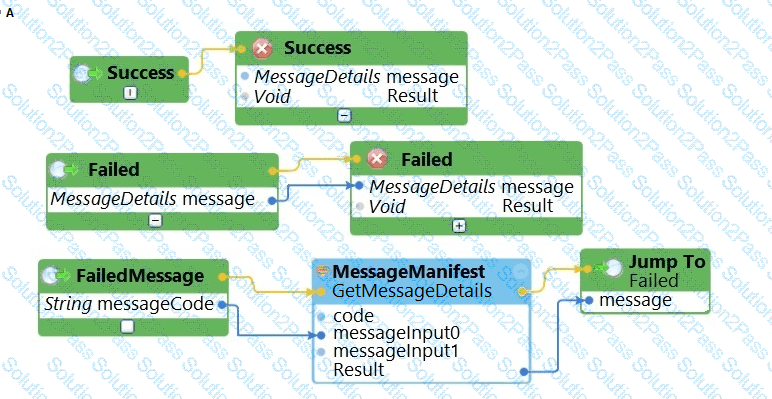
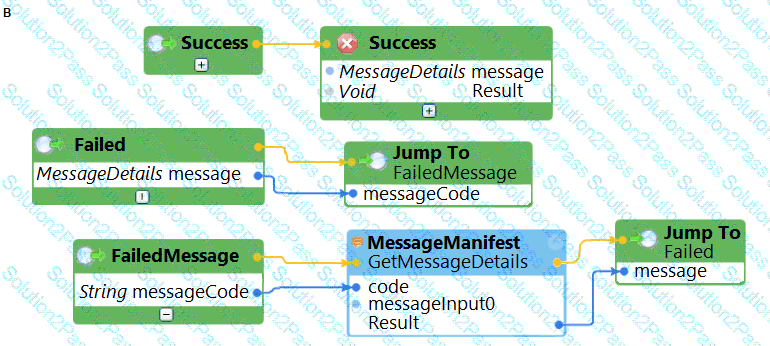
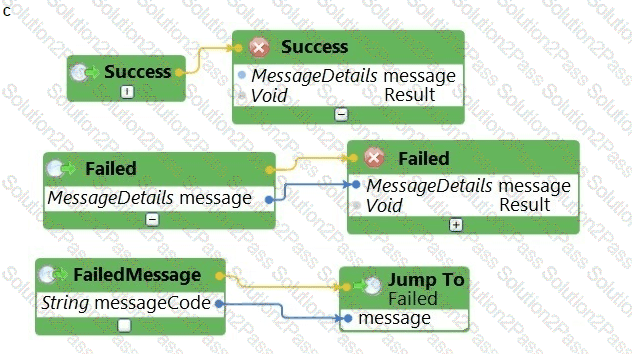
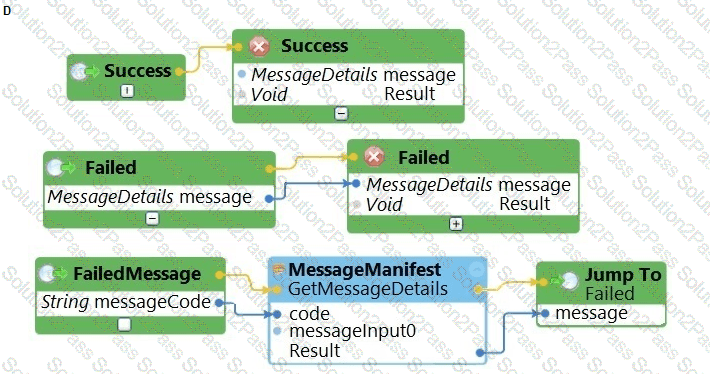
The business requirements states that the login automation creates a Success or Failed response when attempting to log in to the finance application. If a failure occurs, the automation should pass a message code with the Message Manifest before exiting the automation.
Which image represents the exit logic?
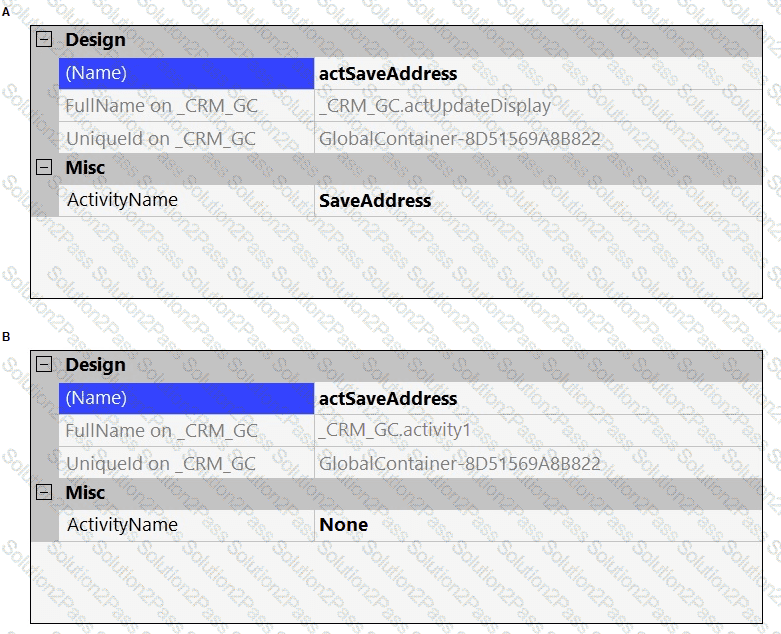
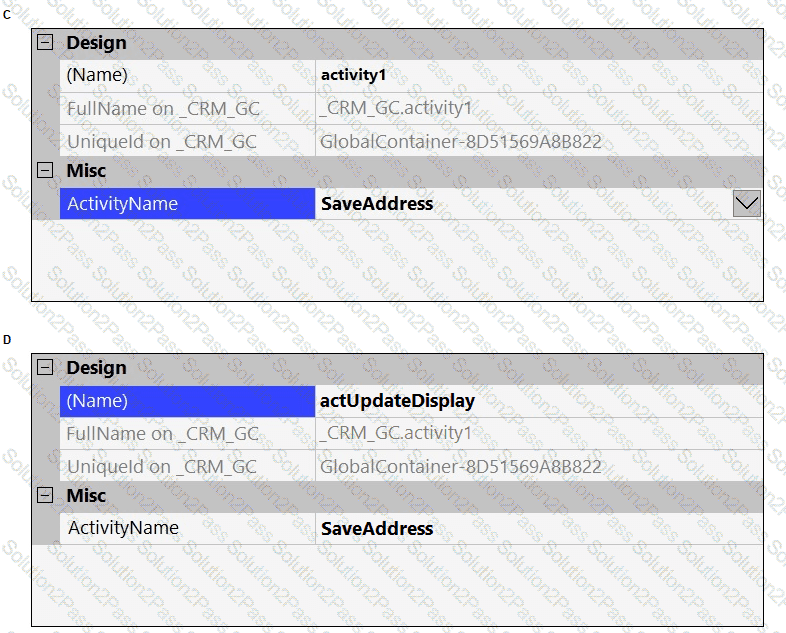
The business requirement states the solution should update and save the address to all applicable applications in the solution. The interaction configuration file is already configured with the SaveAddress activity. You are now ready to add an Activity component to a project using standard naming conventions.
Which option meets the requirement for configuring the Activity component?
The variable varInput is a String that holds the value What is the output?
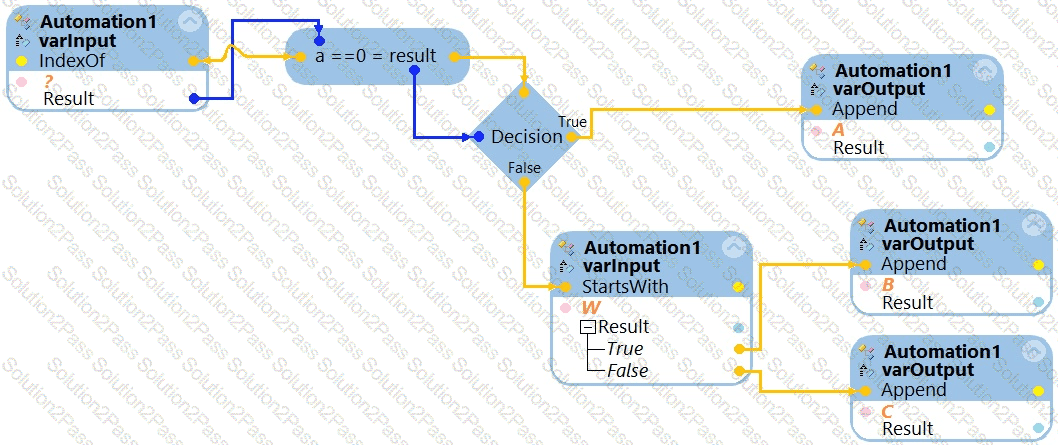
What is the outcome of the above automation?
In an automation that contains an ExcelRange component, you make a change to the data within the range, and you want to save those changes to the Excel file on disk.
Which of the following statements is valid?
Select the two statements that correctly describe application project items. (Choose Two)
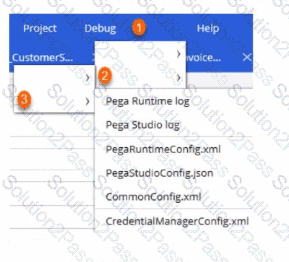
Before deploying your robotic project, you realize that the connection parameters (or Pega Robot Manager, the Pega Robot Runtime settings, and the application login credentials for Assisted Sign-On need updating to reflect the production environment.
Arrange the three steps, as shown in the following figure. that you click in the correct order to access the necessary configuration files. (Choose Three).


The project you are working on has two applications: BankerInsight and Pega Finance. You are working on the BankerInsight application method. Which three elements are not available to be used on the application method’s design surface? (Choose Three)
Your log on automation is failing and you cannot proceed because the Submit button is not enabled. After searching the HTML code, you discover that the Submit button is enabled only after the Password field experiences a key press.
How do you resolve the automation issue?
Your Pega Robot Manager indicates that one of your robots has an unhealthy status and has failed several assignments.
What is the first step in troubleshooting an unhealthy robot?
Which two statements about Label/Jump To functionality are true? (Choose Two)
What is the scope of a const_msgID variable that you add to the project from the Toolbox tab of the Globals designer?
In which two ways do the two publishers, Log4Net and File Publisher, differ? (Choose two.)
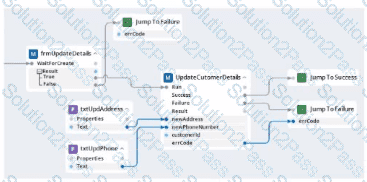
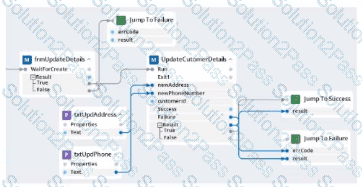
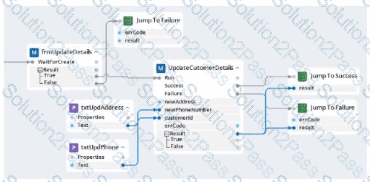
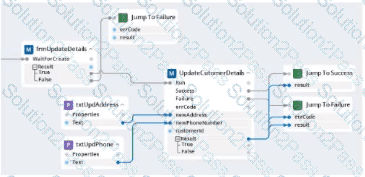
Within your project for a car renting company, you create an automation that reads data From an online form and calls a subautomation that saves that data in the company's application. The UpdateCustomerDetails subautomation has two exit points, Success and Failure, and two output parameters. Result and errCode.
Which figure represents this subautomation?
A)
B)
C)
D)
An attended automation sources a data page to populate properties in your Pega application. Though several debugging tests show the automation executing fully, the automation does not properly source the data page in time to return the values to the Pega application.
This issue may be a result of which one of the options below?
During project testing, an issue requires you to add a diagnostic log component to track the log files to help determine a resolution. After testing, you decide not to remove the diagnostic log component from the automation and decide to simply turn off the log component.
Which diagnostic log component setting allows you to turn the logging component off temporarily?
An automation requires the web adapter to attach to a running instance of Internet Explorer.
How do you achieve this requirement?
Automation you are working on creates a data collection, so you have extracted a Data Table proxy. What action occurs when you drag the DataTableProxy from the Globals section of the Palette to the automation surface?
To modify an object’s default properties before use in a project, which setting must be updated?
