Summer Sale Special - Limited Time 70% Discount Offer - Ends in 0d 00h 00m 00s - Coupon code: xmaspas7

Easiest Solution 2 Pass Your Certification Exams

AD0-E911 Adobe Workfront Project Manager Certified Professional Free Practice Exam Questions (2026 Updated)

Prepare effectively for your Adobe AD0-E911 Adobe Workfront Project Manager Certified Professional certification with our extensive collection of free, high-quality practice questions. Each question is designed to mirror the actual exam format and objectives, complete with comprehensive answers and detailed explanations. Our materials are regularly updated for 2026, ensuring you have the most current resources to build confidence and succeed on your first attempt.

Page: 1 / 2
Total 95 questions

A project manager is managing a project and realizes a task is delayed. They want to see how downstream tasks are impacted.

Which feature of the Gantt chart will help them understand this?

A.

Actual Dates

B.

% Complete

C.

Critical Path

Which wildcard should be used in a task report when using an Assigned To filter to show the logged-in user all tasks to which she is assigned as the primary task owner?

A.

USER.NAME

B.

USER.ID

C.

USER.roleID

A project manager has been asked to create a report showing the planned completion date for all the project manager ' s projects. The report must show results in a calendar view and all entries should be purple. What steps should the project manager take to create this view?

A.

Visit the Reports page and create a new report. In the filter, update the project Owner ID field with the project manager’s name and set the Color ID field to purple. Add a column for Planned Completion Date and set the default view to “Calendar View.”

B.

Visit the Calendars page and create a new calendar. In the filter, update the date field to Planned Dates and update the Project Owner ID field with the project manager’s name. Set the color to purple.

C.

Visit the Reports page and create a new calendar. In the filter, update the Project Owner ID field with the project manager’s name and set the Color ID field to purple. Add a column for Planned Completion Date.

A project manager has set up and launched a new project for an annual marketing campaign.

Where can the project team locate their work requests?

A.

Email, Workfront Home, Project tasks list

B.

Email, Automatic Reminders, Workfront Home

C.

Event Notifications, Approval processes, Email

Which two statements are true about Groups and Teams? (Choose two.)

A.

A Team can be assigned to a task, but a Group cannot be assigned to a task.

B.

Objects can be shared with either a Group or a Team.

C.

A Group can be assigned to a task, but a Team cannot be assigned to a task.

D.

Work requests can be routed to either a Group or a Team.

A creative team accesses their assigned work in a My Tasks list report. The team would like to easily see any New tasks highlighted for visibility. How can the project manager accommodate the team’s request?

A.

Schedule a daily automatic report delivery of the New tasks in the report to the team.

B.

Create a grouping for task Progress Status and use a custom color pie chart for visibility.

C.

Create a Filter that uses conditional formatting to display New tasks only.

D.

Create a View that uses Column Rules to format the New tasks for visibility.

Which field is used to create a milestone step on a milestone path in the Setup area?

A.

Status

B.

Description

C.

Key

A project manager needs to locate the fixed revenue and costs of a project. Where should the project manager look to find this information?

A.

Business Case

B.

Billing Records

C.

Project Details

A marketing team wants to manage their projects using a traditional, sequential approach where each phase must be completed before the next begins.

Which project management methodology in Workfront supports this approach?

A.

Scrum

B.

Kanban

C.

Waterfall

What are two characteristics of a Group in Workfront? (Choose two.)

A.

A Group can be tagged in an Update thread communication.

B.

A Group assignment is not required for a user.

C.

A Group can be associated with a Company or a Project.

D.

A user can be assigned as Group Administrator of a Group.

Which aspect of a project determines the Progress Status?
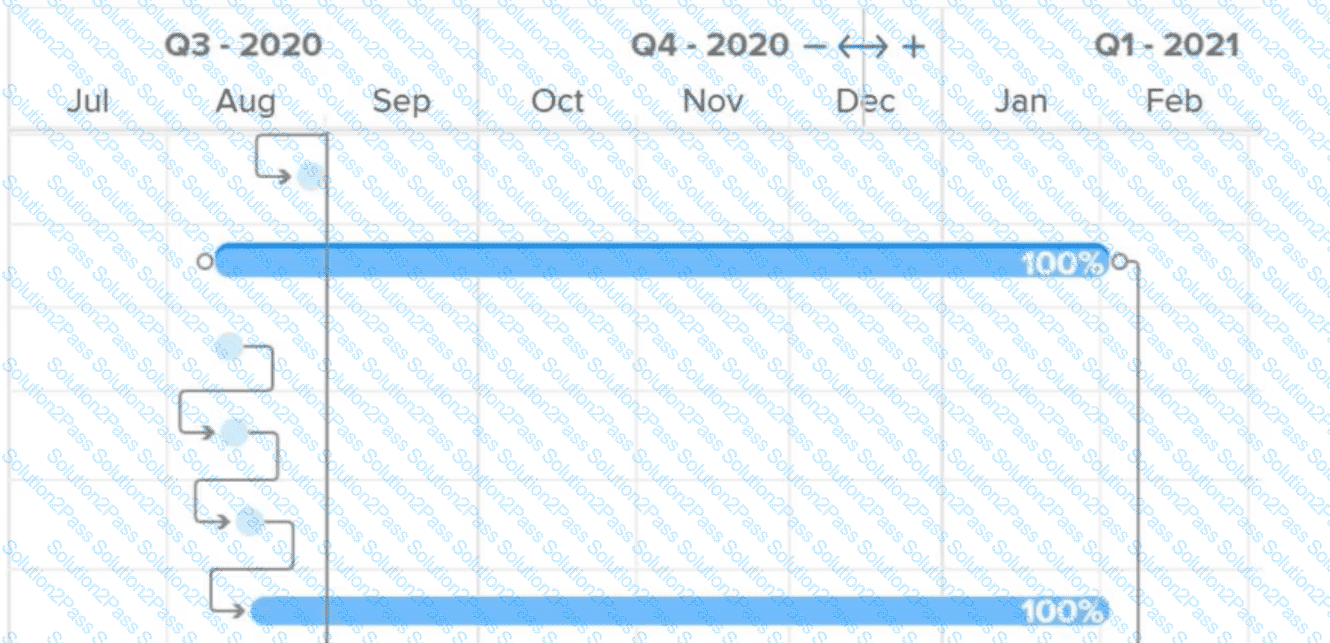
A.

Timeline

B.

Critical Path

C.

Milestone Tasks

What do the connector lines between tasks in a Gantt chart represent?

A.

Critical path

B.

Multiple assignments

C.

Predecessor relationship

An IT department needs to see the Group and Portfolio of each of its projects for reporting purposes.

In which project area does this information reside?

A.

Queue Details

B.

Project Details

C.

Metrics

What are two ways to associate milestone steps to tasks? (Choose two.)

A.

In-line editing a task list on a project

B.

From the Milestone View in the Projects area

C.

Through bulk-editing multiple tasks

D.

In the settings area of a task

Which two options are available with Workfront reports? (Choose two.)

A.

A chart report that references a multi-select custom field

B.

Planned date-based calendar reports

C.

Filters with a custom grouping

D.

An object name with more than 500 characters

Task 2 has a 5-day duration, is tied to Task 1 with a predecessor, and is expected to begin once Task 1 is completed. Due to a resource availability conflict, Task 1 was rescheduled to start 1 week later. Once Task 1 was rescheduled, the planned start date on Task 2 did not dynamically shift by 5 days as expected but instead remained the same planned start date that existed before the change to Task 1.

What may have caused the planned start date of Task 2 to remain the same?

A.

The primary assignee had already submitted a Commit Date for the previous planned start date on Task 2, even though the project owner did not accept this Commit Date, the project plan made this date a Must Start On Constraint on Task 2.

B.

The project owner has at some point made a manual change to the planned start date of Task 2, which has in turn changed the Task Constraint of Task 2 to Must Start On.

C.

The primary assignee had scheduled time off during the new planned start date that Task 2 should have shifted toward. Due to this time off scheduled the date remained the same.

D.

The project owner has at some point made a manual change to the Task Constraint of Task 2 to As Soon As Possible, which has forced the date of Task 2 to be static.

A team lead wants to see all hours that have been logged this month by members of the team lead’s home team, organized by project. How should the team lead create this view?

A.

Navigate to a specific project and open the Hours tab. Filter the view by Owner > Home Team ID > Equal > [Name of Home Team] and Hour > Entry Date > This Month. Repeat on all projects in which team members are assigned.

B.

Visit the Reports area and create a new Hour report. Add the filters for Owner > Home Team ID > Equal > [Name of Home Team] and Hour > Entry Date > This Month. Group the results by Project > Name.

C.

Visit the Reports area and create a new Hour report. Add the filters for Hour > Entry Date > This Month and Project Status > Equal > Complete. Group the results by Project > Name.

D.

Visit the Teams landing page and on the Workload Balancer select the users ' home team. Add the user filters for Task > Actual Start Date > This Month, click Apply. Update view settings and toggle on the Show remaining time setting.

Which project status will default the automatic Project Condition to “On Time”?

A.

Idea

B.

Planning

C.

On Hold

An executive wants to see the actual cost of projects within a selected portfolio, allowing for multiple reports with the option to select a specific portfolio, sorted in a descending order, so the most expensive projects appear on top. Which steps should be taken to create this report?

A.

Visit the Reports area and create a new Project report. Add a column for Actual Cost and sort the column in descending order. From the Reporting Settings dropdown, add a prompt for Portfolio Name.

B.

Visit the Reports area and create a new Project report. Group the results by Portfolio Name. Add a column for Actual Cost and summarize this column by SUM.

C.

Visit the Reports area and create a new Project report. Add a column for Actual Cost and sort the column in descending order. Group the results by Portfolio Name.

An organization has created unique data fields relevant to their projects. Starting by navigating from a project ' s landing page, where is this data found?

A.

Project Details > Custom Forms

B.

Project Details > Overview

C.

Business Case > Project Info

Page: 1 / 2
Total 95 questions
Copyright © 2014-2026 Solution2Pass. All Rights Reserved